



Modern HR teams need more than spreadsheets and scattered systems to keep work moving smoothly. From employee records and attendance to leave and payroll, HR software brings essential processes together in one place.
But how to choose an HR software in Nepal? The right choice isn’t simply the one with the most features. It’s the one that fits your HR needs, simplifies everyday work, supports compliance, and grows with your organization.
So, what should you actually look for in an HRMS? Here’s a simple step-by-step guide to choosing the right solution with confidence.
In this blog
Why Should HR Professionals Move From Manual Processes to HR Software?
HR software helps HR teams save time, reduce errors, and manage employee information in one place. It replaces repetitive manual work with connected processes, giving HR more time to focus on people and decisions. But before choosing a system, it helps to understand what HR software should actually improve.
- Save time on attendance and leave tracking
- Reduce errors across connected HR processes
- Prepare payroll with less manual work
- Keep employee records organized and accessible
- Generate HR reports faster
- Give employees convenient self-service options
- Make leave applications and approvals easier
- Give employees quicker access to payslips
- Let employees access HR services remotely
- Respond to employee requests more quickly
- Centralize HR data for better decisions
Once you know why your HR team needs digital tools, the next step is clear: identify what you actually need from HR software.
How to Choose the Right HR Software: 5 Steps to Follow
Choosing the right HR software starts with identifying your needs, defining requirements, comparing providers, testing the system, and checking its overall value. A step-by-step approach helps you avoid paying for unnecessary features and choose a solution your HR team can actually use. Here’s how to move from identifying your needs to making a confident decision.
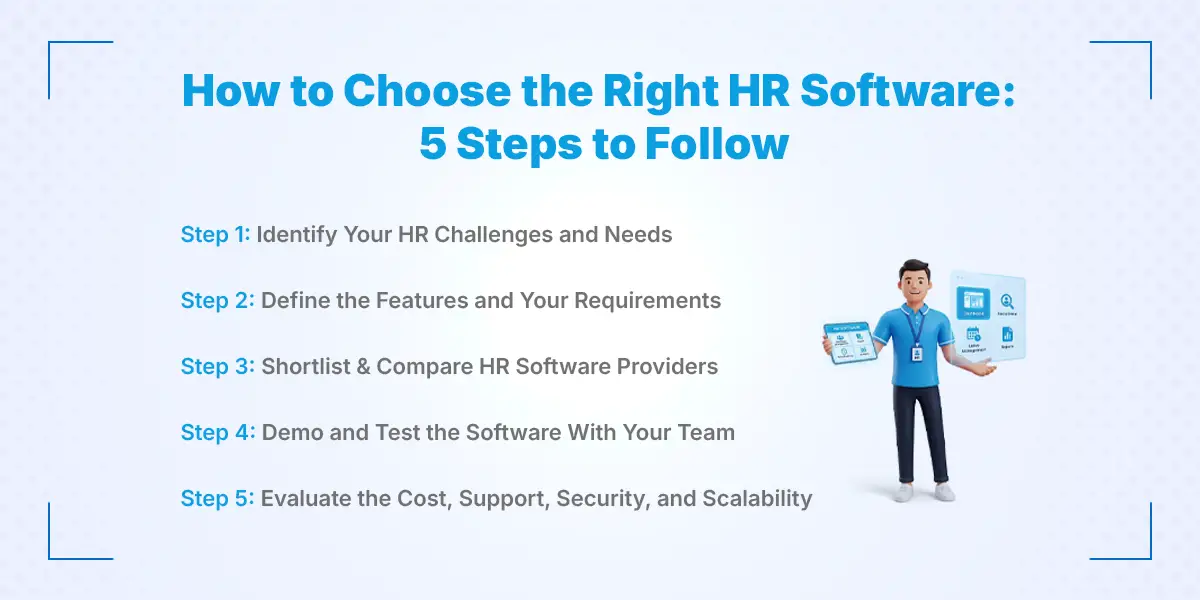
Step 1: Identify Your HR Challenges and Needs
Start by looking at where your current HR processes slow your team down. Identify repetitive tasks, manual work, errors, and processes that are difficult to track. This gives you a clear picture of what your HR software needs to solve.
Step 2: Define the Features and Your Requirements
Turn those challenges into specific software requirements. Decide which features you need, such as employee records, attendance, leave, payroll, reporting, or employee self-service. Separate must-have features from nice-to-have features to keep your search focused.
Step 3: Shortlist & Compare HR Software Providers
Look for providers that match your essential requirements and understand the needs of businesses in Nepal. Compare their features, integrations, pricing, user experience, and available support. Narrow your options to a few suitable providers before making a decision.
Step 4: Demo and Test the Software With Your Team
Don't rely on screenshots or feature lists alone. Request a live demo and ask the provider to show how the software handles your actual HR processes, then let HR staff and employees test it themselves.
Step 5: Evaluate the Cost, Support, Security, and Scalability
Finally, look beyond the subscription price and assess the total cost, data security, implementation, customer support, and future scalability. Choose software that fits your current budget while remaining reliable and useful as your organization grows.
Ready to Make HR Simpler?
Explore a smarter way to manage your people, payroll, attendance, and everyday HR processes.
10 Things to Check When Choosing HR Software in Nepal
The right HR software should solve your current HR problems, connect your core processes, support Nepal’s payroll needs, and remain useful as you grow. It should also be easy for your HR team and employees to use, work with your existing tools, protect employee data, and offer clear value for its cost. Here are the key things to check before choosing your HR software.
1. Does It Solve Your Current HR Problems?
Start with your problems, not the software’s feature list. Identify the HR tasks that take the most time, create errors, or still rely heavily on manual work. The goal is to find software that addresses your biggest bottlenecks, not one that simply offers the most modules.
Ask yourself:
- Which HR tasks take the most time?
- Where do errors happen most often?
- Which processes are still manual?
- Which information is difficult to find?
- What does HR repeatedly calculate or reconcile?
2. Does It Cover Your Core HR Processes?
Look for software that can bring your key HR activities into one connected system. Depending on your organization, this may include employee records, attendance, leave, payroll, onboarding, performance, documents, and reporting. Connecting these processes can reduce duplicate work and keep information consistent across HR operations.
3. Can It Handle Payroll and Nepal’s Compliance Requirements?
Payroll is one area where your HR software needs to fit your actual requirements. Check whether it can support income tax/TDS, SSF, PF, CIT, deductions, allowances, overtime, payslips, and the payroll reports your organization needs. Instead of asking only whether it has payroll, ask whether it can handle your salary structure and reporting requirements.
4. Can It Connect With Your Attendance System?
If your organization uses biometric devices, check whether the software can connect with them smoothly. Also look for support for mobile or web attendance, multiple devices, shifts, branches, overtime, and late or early tracking. Ideally, attendance data should flow directly into payroll system instead of requiring HR to export, check, and re-enter information.
Simplify Attendance & Payroll Today!
5. Does It Give Employees and Managers Self-Service Access?
A good HR system should reduce routine requests reaching the HR desk. Employees should be able to handle tasks such as applying for leave, checking attendance, viewing payslips, and updating certain personal details, while managers can review and approve requests.
Ask the vendor: Which HR tasks can employees complete without contacting HR?
6. Is the Software Easy to Use?
Even a feature-rich system won't help much if people struggle to use it. Check the dashboard, navigation, mobile experience, reporting, and workflow setup from the perspective of HR, managers, and employees. Ask for a live demo using your actual HR processes rather than relying on a generic product presentation.
7. Can It Scale With Your Organization?
Choose software that can grow alongside your organization instead of solving only today's problems. Consider future employees, branches, departments, shifts, leave policies, HR modules, and reporting needs. A scalable HRMS should make expansion easier, not require you to change systems again.
8. Does It Integrate With the Tools You Already Use?
Your HR software shouldn't create another isolated system. Check whether it can integrate with biometric devices, accounting software, banking or payroll workflows, email, APIs, and other tools you already depend on. Better integration means less duplicate data entry, fewer errors, and smoother HR operations.
9. How Secure Is Your Employee Data?
HR software handles employee information that shouldn't be accessible to everyone. Check user roles, access permissions, backups, security practices, audit trails, data ownership, and the vendor's data policies. Most importantly, understand exactly who can access salary, personal, attendance, and performance information.
10. What Is the Total Cost, not Just the Subscription Price?
Don't compare HR software based only on its monthly or annual subscription. Consider setup, data migration, training, customization, integrations, support, additional modules, and future expansion costs as well. Looking at the total cost of ownership (TCO) gives you a clearer picture of what the software will actually cost.
Actual cost = Software + implementation + migration + integrations + support
Still Managing HR Manually?
Tired of spreadsheets, manual payroll, attendance tracking, and endless HR requests? See how an HR software helps.
How to Know You're Ready to Switch to HR Software
You may be ready for HR software if your team spends too much time on manual records, payroll, attendance, leave, approvals, and routine employee requests. These may seem like small tasks individually, but together they can take hours, increase errors, and keep HR focused on administration instead of people. If several of the signs below sound familiar, it may be time to move your HR operations to a digital system.
- Payroll takes hours to prepare every month
- Attendance is still tracked manually
- Leave requests come through WhatsApp or paper
- Employee records are scattered across multiple files
- Employees regularly ask for payslips or attendance details
- Managers rely on HR for routine approvals
- HR reports take too long to prepare
- Payroll involves repeated manual calculations
- Your current system struggles as you grow
If your HR team is spending more time managing information than managing people, it may be time to digitize.
Which Software Is Best for HR Teams in Nepal?
Pace HRMS is becoming a popular choice among HR teams in Nepal, especially for its customization options, affordable pricing, mobile app, and strong customer support. It brings key HR functions such as employee management, attendance, leave, payroll, and recruitment into one platform.
Other popular HRMS options include Nimble HRM, which have been in the Nepali market for a long time, and Nepal HRM & Hajir HR, which is still building its presence in the market.
The right software ultimately depends on your business size, HR needs, budget, and the level of automation you want. Here’s a simple comparison of the major options:
| Feature | Pace HRMS | Nimble HRM | Nepal HRM |
|---|---|---|---|
| Employee Management | Comprehensive | Moderate | Developing |
| Attendance & Leave | Automated | Available | Available |
| Payroll Automation & Accuracy | Most Accurate | Available | Available |
| ATS-Integrated Recruitment | Fully Integrated | Not Available | Available |
| Mobile App | Available | Available | Available |
| Customization | High | Moderate | Moderate |
| Affordability | High | Moderate | Moderate |
| Customer Experience | Responsive & Dedicated | Mixed Reviews | Developing |
| Overall Fit | Excellent | Good | Fine |
Overall, Pace HRMS offers the strongest balance of features, flexibility, affordability, and support. This makes it a particularly good choice for growing businesses that want to manage their HR operations from one system.
Final Checklist: Choosing an HR Software in Nepal
Before choosing an HRMS, run through this checklist. If you can confidently tick most of these boxes, you’re closer to choosing a system that fits your HR team, not just one with an impressive feature list.
Before choosing an HRMS, make sure it:
☐ Solves your biggest HR bottlenecks
☐ Centralizes employee information in one place
☐ Automates attendance and leave management
☐ Supports your payroll structure and requirements
☐ Handles relevant Nepal compliance requirements
☐ Integrates with your attendance or biometric devices
☐ Gives employees and managers self-service access
☐ Has appropriate security and access controls
☐ Is easy for HR teams, managers, and employees to use
☐ Can scale as your organization grows
☐ Integrates with your existing systems and tools
☐ Provides reliable implementation, training, and support
☐ Clearly explains the total cost of using the software
One final question to ask: Will this HRMS make our daily HR work simpler, faster, and more reliable?
If the answer is yes, you’re likely looking at a solution that fits your organization, not just a software package with more features.
Conclusion
The best HR software in Nepal is not the one with the most features, it’s the one that solves your biggest HR challenges, simplifies daily work, protects your data, and grows with your organization. Start by understanding your needs, define your must-have HRMS features, compare providers, test the software, and look beyond the price tag to evaluate support, security, compliance, and long-term value.
Because HR teams already have enough to manage. Payroll shouldn’t become a monthly headache. Attendance shouldn’t live in spreadsheets. And employees shouldn’t have to message HR for information they could access themselves. The right HRMS can turn these everyday frustrations into smoother, more organized processes.
So, don’t choose software just to digitize HR. Choose it to make HR work better. Start your shortlist, request a demo, and find the HRMS that fits your team.
Need help improving your HR efficiency? Get expert HR consultation from our team to streamline your processes and build a more effective HR function.
Frequently Asked Questions
Submit your comments

Get Our App On



How to Become an Auditor in Nepal
VIEW DETAILS
What Is the Salary of a Spa Therapist in Nepal?
VIEW DETAILS
How to Start a Career as a Game Developer in Nepal
VIEW DETAILS
What Is the Salary of a Brand Manager in Nepal?
VIEW DETAILS


Loading Comments...