


You open your inbox on Monday and see a coworker turn a two-hour report into a 20-minute task with an AI tool. Your manager notices, and a quiet worry starts: if software can do that, what happens to your job? Many employees feel this pressure right now, and it pushes them to avoid AI completely or to lean on it so hard that their own skills fade.
The safer path sits between those two extremes. This guide shows how to use AI tools at work as a productivity assistant while you build the human skills that make you harder to replace. You will learn which tasks to hand to AI, which skills to grow, which mistakes to avoid, and how to show your employer that you work better with AI, not just more.
In this blog
What Does It Mean to Use AI Tools at Work?
Using AI tools at work means treating software such as ChatGPT, Copilot, or Gemini as an assistant that handles routine tasks, drafts, summaries, and analysis while you keep control of judgment, accuracy, and final decisions, so the tool speeds up your work without replacing your own thinking. The tool produces a fast first version, but you own the outcome, including every fact, number, and promise in it. That split of duties is what keeps you valuable.
- AI as a workplace assistant: It handles first-pass work so you can spend your energy on decisions.
- Automating repetitive tasks: It sorts data, formats files, and fills in standard documents.
- Generating ideas and drafts: It gives you a starting point when the page is blank.
- Summarizing information: It shrinks long reports, threads, and meeting notes into key points.
- Analyzing data: It spots trends and outliers in numbers you would otherwise scan by hand.
- Improving communication: It tightens your writing and adjusts the tone for different readers.
- Supporting decision-making: It lays out options and trade-offs, but the choice stays with you.
- Why human review remains important: It can sound confident while being wrong, so a person must check the result before anyone relies on it.
How Can You Use AI Tools at Work Without Losing Your Job?
You can use AI tools at work without losing your job by handing routine tasks to AI, reviewing every output yourself, and building skills that software cannot copy. Employees who follow this approach finish work faster and also show more judgment than those who copy and paste. Below are five habits that raise your value instead of lowering it.
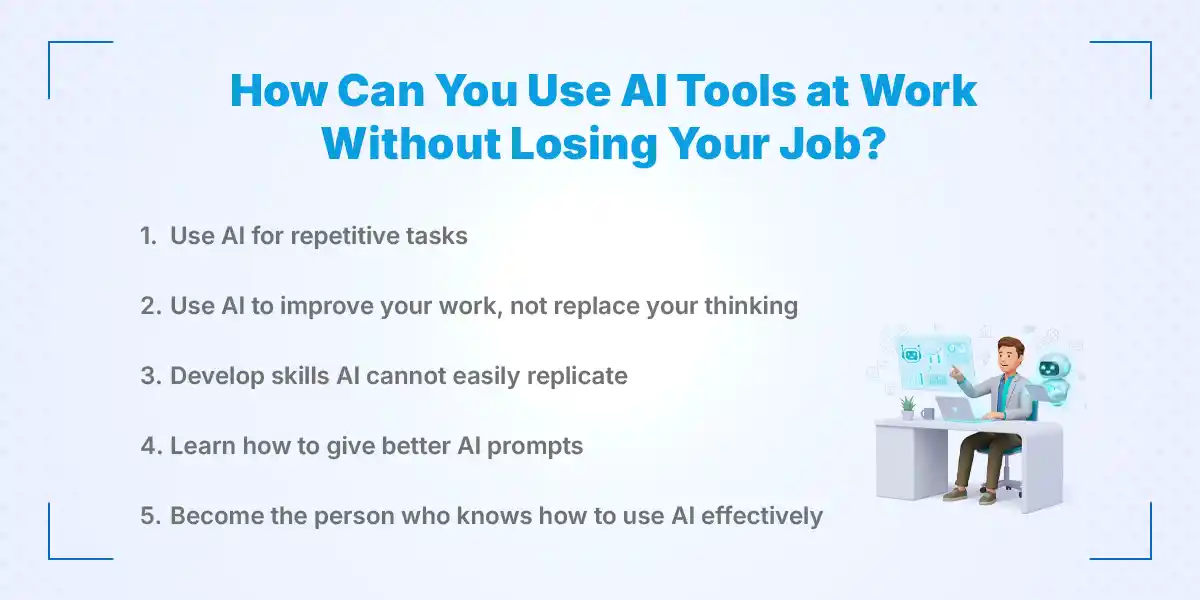
1. Use AI for Repetitive Tasks
Repetitive work drains time but rarely shows your real talent, so it is the best place to start. Let AI organize data, run basic research, summarize meetings, format documents, and draft routine messages. Give it the raw material, such as meeting notes or a messy spreadsheet, and ask for a clean structure you can edit. Track the minutes you save each week, because you will use that number later to prove your value.
2. Use AI to Improve Your Work, Not Replace Your Thinking
AI works best as a starting point, not a finish line. Ask it for a first draft, then read the draft slowly and rewrite the parts that sound generic. Add your own examples, company knowledge, and lessons from past projects, and fact-check every claim that affects a decision. A simple rule helps here: nothing leaves your desk until you can explain every line without the tool.
3. Develop Skills AI Cannot Easily Replicate
AI handles patterns well, but it struggles with context, trust, and real-world consequences. Critical thinking, communication, leadership, creativity, problem-solving, and emotional intelligence all fall into that gap. Practice them on purpose, for example by leading a meeting, mentoring a new hire, or handling a tense client call. These skills turn you from a task doer into someone the team relies on when the situation gets messy.
4. Learn How to Give Better AI Prompts
A vague prompt gets a vague answer, and that wastes the time you meant to save. Give clear context, define the output you want, add an example, and name the audience and tone. Then review the response and ask follow-up questions to refine it, because the second or third version is usually the best one. Save your best prompts in a document so you can reuse them and share them with your team.
5. Become the Person Who Knows How to Use AI Effectively
Companies keep the people who make everyone else faster. Learn the AI tools built for your profession, find the tasks in your week that AI can improve, and turn what works into a repeatable workflow. Share that workflow with your team and measure the result in hours saved or errors reduced. When your manager sees numbers, you become the person who leads AI adoption instead of the person AI might replace.
Which AI Tasks Should You Automate at Work?
You should automate tasks that are repetitive, low-risk, and easy to check, such as drafting routine emails, summarizing meetings, and organizing content. These tasks save time without touching the parts of your job that need judgment. A good test is to ask whether a mistake would cost money, harm a customer, or expose private data.
- Repetitive administrative tasks: Scheduling notes, status updates, and standard forms.
- Drafting routine emails: Confirmations, reminders, and simple follow-ups.
- Creating meeting summaries: Key decisions, owners, and deadlines from your notes.
- Brainstorming ideas: Headlines, campaign angles, and solutions to test.
- Research assistance: Background reading and topic overviews you then verify.
- Creating first drafts: Reports, proposals, and outlines that you finish yourself.
- Spreadsheet assistance: Formulas, cleanup steps, and explanations of confusing sheets.
- Content organization: Sorting notes and documents into clear categories.
- Basic data analysis: Simple trends, totals, and comparisons.
- Creating templates: Reusable formats for reports, emails, and checklists.
Important: Keep human oversight for any task that involves confidential information, sensitive decisions, customers, finances, or major business consequences.
What Skills Should You Build Alongside AI?
AI literacy alone is not enough because every colleague can learn the same tools, so employees should pair AI skills with human strengths such as critical thinking, communication, and industry knowledge that let them judge, direct, and improve what AI produces at work. The tool gives everyone the same speed, so your judgment becomes the difference. Build skills in pairs, one technical and one human, so that each supports the other.
- AI literacy: Know what AI tools can do, where they fail, and which one fits each task.
- Critical thinking: Question AI answers instead of accepting the first one.
- Problem-solving: Break a messy issue into steps and choose the right fix.
- Communication: Explain ideas clearly to people who do not share your background.
- Creativity: Bring original angles that a pattern-based tool tends to miss.
- Adaptability: Adjust quickly when your tools or processes change.
- Leadership: Guide others through new workflows and take responsibility for results.
- Industry knowledge: Understand your field well enough to spot a wrong AI answer at once.
- Data literacy: Read charts and numbers with care, and know where the data came from.
- Decision-making: Weigh risks and make the final call with confidence
How Can AI Make You More Valuable to Your Employer?
AI makes you more valuable when you use it to deliver better results, not just faster ones. Employers pay for outcomes such as accurate reports, happy customers, and fewer errors. Going beyond simply asking ChatGPT for text means building repeatable systems around it.
- Complete routine work faster and use the saved time on higher-value tasks.
- Improve the quality of first drafts by giving AI better context.
- Find information more efficiently across documents, reports, and research.
- Identify patterns in data that support better decisions.
- Create clearer, more useful reports.
- Support team members by sharing prompts and shortcuts.
- Develop new workflows that others can copy.
- Reduce avoidable errors through review checklists.
- Spend more time on strategic and creative work.
Here is how that looks across six common roles:
| Role | What AI Can Handle | What You Add |
|---|---|---|
| SEO Employee | Groups keywords and drafts meta descriptions | Checks search intent, confirms facts, and picks which pages matter most |
| HR Professional | Drafts job descriptions and interview questions | Judges culture fit, handles sensitive talks, and reviews wording for bias |
| Accountant | Writes spreadsheet formulas and flags odd entries | Verifies figures, applies tax rules, and advises clients |
| Marketer | Produces campaign ideas and ad copy variations | Sets brand voice, chooses strategy, and reads campaign results |
| Salesperson | Summarizes prospect research and drafts follow-ups | Builds trust, reads the room, and negotiates |
| Customer-Service Employee | Drafts reply templates and summarizes ticket history | Shows empathy, solves complex cases, and decides on exceptions |
What Are the Biggest Mistakes to Avoid When Using AI at Work?
The biggest mistake is treating AI output as finished work, because AI can sound confident while being wrong. Other common errors involve privacy, overdependence, and ignoring company rules. Avoiding them protects both your reputation and your job.
- Copying AI content without review: Errors and generic phrasing slip straight into your work.
- Sharing confidential data with the wrong tools: Public AI tools may store what you type.
- Depending on AI for every decision: Your judgment weakens when you stop using it.
- Assuming AI is always accurate: It can invent facts, sources, and numbers.
- Failing to build your own skills: Speed without growth leaves you replaceable.
- Hiding AI use when policy requires disclosure: A small shortcut can become a trust problem.
- Using work you do not understand: You cannot defend or fix what you cannot explain.
- Ignoring company AI policies: Rules on approved tools and data exist for a reason.
- Producing more instead of better: A larger pile of average work does not help anyone.
How to Use ChatGPT at Work Effectively
ChatGPT works best at work when you treat it as a productivity assistant that drafts, organizes, and explains, and when you verify every important output, such as figures, legal points, and client details, before you use it in any professional setting. Start with small tasks, and give it context about your role, audience, and goal. A tip that saves time is to paste in a sample of your own past writing and ask ChatGPT to match that style.
- Writing and improving emails: Ask it to shorten, soften, or sharpen a message you already wrote.
- Brainstorming ideas: Request ten options, then combine the best parts yourself.
- Creating content outlines: Give the topic and audience, and ask for a logical structure.
- Summarizing information: Paste in long text and ask for key points and open questions.
- Creating checklists: Turn a process into clear steps that a new teammate can follow.
- Explaining complex topics: Ask for a simple explanation, then a deeper one.
- Preparing interview questions: Base them on the role's skills and your scoring criteria.
- Organizing research: Sort notes into themes and flag gaps.
- Generating spreadsheet formulas: Describe the columns and the result you want, then test the formula on a few rows first.
- Creating first drafts: Get a rough version fast, then rewrite it with your own expertise.
How to Protect Your Job in an AI-Driven Workplace
You protect your job by learning how AI is changing your role and by becoming the person who uses it well and takes responsibility for the results. Employers rarely replace the employee who improves the team's output and can prove it. Use the steps below as a simple plan.
- Understand how AI is changing your role: Read your job description and ask which parts a tool could already do.
- Identify tasks likely to be automated: Repetitive, rule-based work goes first, so plan for that.
- Learn the tools used in your industry: Job postings and industry groups show which tools matter.
- Strengthen skills that complement automation: Focus on judgment, relationships, and problem-solving.
- Take responsibility for outcomes, not just tasks: Own the result, not only the steps.
- Keep learning continuously: Set aside a few hours each month to test a new tool or feature.
- Document measurable improvements from AI: Record hours saved, errors reduced, or turnaround times improved.
- Stay adaptable when technology changes: Tools will change often, so the habit of learning matters more than any single tool.
AI Skills Employees Should Learn for Career Growth
The best AI skills to learn are the ones that help you produce accurate, useful work faster and explain how you did it. Start with the basics and add skills that match your field. Each skill below also makes your resume stronger.
- Prompt writing: Give clear instructions, context, and examples.
- AI-assisted research: Gather background quickly, then confirm it with reliable sources.
- AI-powered content creation: Draft and edit text, images, or presentations with review built in.
- Data analysis with AI: Ask questions of your data and check the answers against the source.
- Automation basics: Connect simple tools so repeat tasks run with less effort.
- AI-assisted productivity: Plan, prioritize, and organize your day with smart tools.
- Fact-checking AI outputs: Verify claims, numbers, and sources before use.
- AI ethics and responsible use: Protect privacy, avoid bias, and follow policy.
- Understanding AI limitations: Know when a tool guesses, and when it should not be trusted.
- Industry-specific AI applications: Learn the tools built for finance, HR, marketing, sales, or support.
Conclusion
The one idea to act on is ownership. AI can produce a draft in seconds, but it cannot answer for the result, so the employee who checks, improves, and stands behind the work stays essential. Treat AI as a tool that w idens what you can deliver, verify what it produces, and read your company's AI policy before you start.
Pick one repetitive task this week, hand the first pass to AI, review it carefully, and record the time you save. To keep building job-ready skills and find roles that value them, explore the career resources and job openings on KumariJob.
Frequently Asked Questions
Submit your comments

Get Our App On


Why Am I Not Getting Shortlisted for Jobs?
VIEW DETAILS
Why Job Vacancies Disappear Without Hiring Anyone
VIEW DETAILS
Why Are Companies Not Hiring Freshers?
VIEW DETAILS
Should I Accept a Job With Low Salary for Experience?
VIEW DETAILS


Loading Comments...